Thursday, February 26, 2015
Week 7a Illustrator Extended Practice
Let's begin.
TASK 1
Complete BOTH of the following tutorials in separate documents:
(1) Drawing a Moon Illustration - http://www.wikihow.com/Draw-a-Moon-in-Adobe-Illustrator
Tuesday, February 17, 2015
Week 6 - Practical Design Projects
(1) TASK 1 Design Terminology - Define the following design terms and locate at least two example images from the Internet that illustrate the term. Please properly site and attribute the url source in the caption of each photo.
- Contrast (Size contrast, shape contrast, texture/color contrast)
verb (used with object)
1.
to compare in order to show unlikeness or differences; note the opposite natures, purposes, etc., of:
Contrast the political rights of Romans and Greeks.
http://www.superbwallpapers.com/digital-art/contrast-tree-8958/
- Emphasis
noun, plural emphases [em-fuh-seez] (Show IPA)
1.
special stress laid upon, or importance attached to, anything:
The president's statement gave emphasis to the budgetary crisis.
https://stifmister22001.files.wordpress.com/2013/08/emphasis.jpg
- Balance (informal balance, and formal balance)
1.
(Informal Balance)
a state of equilibrium or equipoise; equal distribution of weight, amount, etc.
informal balance, is more complex and difficult to envisage. It involves placement of objects in a way that will allow objects of varying visual weight to balance one another around a fulcrum point. This can be best imagined by envisioning a literal balance scale that can represent the visual "weights" that can be imagined in a two dimensional composition. For example, it is possible to balance a heavy weight with a cluster of lighter weights on equal sides of a fulcrum; in a picture, this might be a cluster of small objects balanced by a large objectSymmetrical balance can be described as having equal "weight" on equal sides of a centrally placed fulcrum. It may also be referred to as formal balance. When the elements are arranged equally on either side of a central axis, the result is Bilateral symmetry. This axis may be horizontal or vertical. It is also possible to build formal balance by arranging elements equally around a central point , resulting in radial symmetry.
(Formal Balance)
1-http://38ccda.medialib.glogster.com/media/14277099ea7a3c36fd0d265cb6a536b0a39887d29895bd66f5cca7bcb4c48241/informal-balance.png
2- http://images.dpchallenge.com/images_challenge/0-999/236/1200/Copyrighted_Image_Reuse_Prohibited_91906.jpg
- Proportion
noun
1.
comparative relation between things or magnitudes as to size, quantity, number, etc.; ratio.
http://www.mathsisfun.com/algebra/images/proportion-1a.gif
- Perspective
noun
1.
a technique of depicting volumes and spatial relationships on a flat surface.
Compare aerial perspective, linear perspective.
2.
a picture employing this technique, especially one in which it is prominent:
an architect's perspective of a house.
3.
a visible scene, especially one extending to a distance; vista:
a perspective on the main axis of an estate.
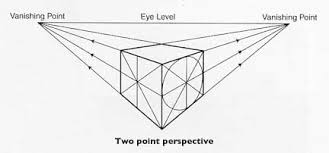
http://mhsart1.wikispaces.com/file/view/two-point-perspective.jpg/228625250/two-point-perspective.jpg
Monday, February 2, 2015
Week 4a Monday - Pen Tool Practice
The easiest way to improve your skills as an artist is to practice drawing; especially drawing what you see. So we'll start this week with more practice drawing shapes using the Pen Tool in Adobe Illustrator CS6.
Copy both Pen Tool cheat-sheets onto your portfolio blog for future reference,
then attempt to do what each chart is showing.


then attempt to do what each chart is showing.


Tuesday, January 27, 2015
Week 3b - Pictogram Design for CHS School Policies
There are two tasks...work with a partner or alone, and use Photoshop or Illustrator to complete.
(1) Create CRENSHAW POLICY THEMED PICTOGRAMS
Each student will choose to MAKE ANY THREE of the following pictograms to demonstrate appropriate student
behavior and our school policies, including: a. -Uniform school dress code
b. -Be seated in class before the late bell c. -Keep cellphones & devices put away
d. -Be responsible, be respectful, be safe
Keep Cellphones and Devices put Away!

Be Seated In Class Before The Late Bell

-Be responsible, be respectful, be safe

Monday, January 26, 2015
Week 3a - Signs and Visual Communication - Digital Art Production Techniques (notes)
Wk 3a - Introduction to Adobe Illustrator
(I) Watch Mr. Webb's demonstration and post notes to do the following on your blog:
- Creating a new canvas (document)Press Command+NSIZE of documents choose "LETTER"
ORIENTATION choose "PORTRAIT" (straight up and down)
- Interface navigation, drawing tools (Illustrator's shapes & using the Pen Tool)TOOL BOX, MENU, AND PANELS (3 parts of illustrator)
SHAPES-Rectangle (M)- click and drag to draw
-Rounded rectangle tool- Click and drag to draw and makes the rectangle with rounded corners.
-Ellipse tool (L)- Click and drag to draw and this tool looks like a circle.
-Polygon- click and drag to draw this tool looks like a simple polygon.
-Flare tool- a drawing of circles that normally would appear when you point a camera at a bright light
- Setting the Fill Color, and the Stroke Color
- Saving file formats (saving for Adobe Illustrator editing vs. Saving an image for the web)
Week 3a - Signs and Visual Communication - Digital Art Production Techniques
Week 3a - Signs and Visual Communication - Digital Art Production Techniques(2)
Get definitions for the following two terms, and copy 6 sample images of each to your blog.
- Monochromatic : Monochromatic colors are all the colors (tints, tones, and shades) of a single hue.
Monochromatic color schemes are derived from a single base hue and extended using its shades, tones and tints. Tints are achieved by adding white and shades and tones are achieved by adding a darker color, gray or black.
- Negative Space: Negative space, in art, is the space around and between the subject(s) of an image. Negative space may be most evident when the space around a subject, not the subject itself, forms an interesting or artistically relevant shape, and such space occasionally is used to artistic effect as the "real" subject of an image.
Subscribe to:
Posts (Atom)


